Most Popular Post

Tuesday, 21 April 2020

Reflective Synopsis - PECHA KUCHA

Hi All,

This is my last post or summation of the last 5 weeks of digital learning. My e-learning, technological experiences and digital pedagogy has come so far, and the application this learning will provide my students will position them well to succeed in the 21st century.

Here is my Pecha Kucha:


If you have any feedback, please leave a comment!

Monday, 6 April 2020

Presentations

Digital Tools: What should I use? 

There are so many forms of digital/ technological media worth investing in when presenting and planning learning experiences for our students. Using pictures, audio, videos, infographics and other forms of digital media is fantastic, although what are you going to present this in? Should you use PowerPoint like everyone else? what about Tik Tok?

Well..... I wouldn't suggest ever downloading Tik Tok as a channel of communication but our future adults and current learners are, and I'm sure you have all seen or heard of students talking, creating and updating their own Tik Tok accounts. The infographic below shows how impact-full Tik Tok has been.

(Image Source: https://au.oberlo.com/blog/tiktok-statistics)
This application, so readily downloaded is an integrative software allowing students and others to present video, audio, pictures and informative text through an intuitive and creative way, globally. This social media platform is designed for users to create, share, interact and discover short music videos, think karaoke but for the digital age. This platform allows an outlet to express yourself through singing, dancing, lip-syncing, comedy and all forms of quirky creativity. It is immensely successful in captivating school aged children, but just how successful?

(Image Source: https://au.oberlo.com/blog/tiktok-statistics)
As a beginner teacher, this information is astounding. Knowing that a presentation platform can be that impact-full and successful makes me wonder why we don't use it or other software with unique characteristics in the classroom? If students take so much joy at home and in public creating, augmenting and sharing their created presentations through Tik Tok, why don't they enjoy doing this in the classroom?

Now we know there are many ways of learning, and with that, many different learning styles. Specific to the classroom climate, engaging all learners may require providing experiences that are visual, auditory and or kinaesthetic.
(Image Source: https://blog.pathwaynewsroom.org/2017/01/discovering-your-learning-style/)
Media can fully support student immersion and captivate, motivate and engage all styles of learners, this is made evident with Tik Tok, YouTube, Facebook and other media outlets. This sort of resource can promote complex content and ideas in a compressed period of time. To be successful I think we as educators need to get creative.

POWTOON

Powtoon is a free web-based animation software that allows easy and creative creations of information and other digital media in a presentation style format. Students can use this to manipulate pre-created presentations, import images, import music or voice overs and import other video format to create their own original presentations. Most common software like this would be PowerPoint and Prezi. All these platforms have unique characteristics and purposes, althoguh creativity is the key to tweaking them for educational purposes. Like Tik Tok, these powerful multimedia tools for students can be used to enhance their engagement, motivation, learning and ICT capabilities. The image below is the home page of Powtoon. This highlights the intuitive design, catering for individualized experiences that caters for all learning capacities.
(Image Source: https://www.powtoon.com/my-powtoons/?#/)
This type of media allows students to be creative and the opportunity to express themselves through a medium that is easily accessible, very customizable and intuitive, being very adaptive to the vast diversity within a classroom. This technology is transferable to higher education and adulthood, allowing learners to augment images, text, colour and audio. These presentations are always then available in the "My Powtoon" section. The added benefit of this technology is being able to export created presentations to YouTube, Facebook, PowerPoint and can also be published as a PDF. An example of what a presentation created with Powtoon looks like: 

So What Makes POWTOON so Good? 

In a short amount of time, I created my own captivating and engaging presentation. The benefit is it's extreme similarities to PowerPoint, meaning students need almost no training or instructions on how to use it. It is intuitive and allows a very simplistic way of presenting a slideshow in movie format.

Click this link to see my created Powtoon presentation. 

However the powerful part of this platform is incorporating student access and use. Allowing students to access and create presentations for HPE and Science tasks would enhance their experiences and interactions with subject content. Providing different and exciting ways to manipulate information and collaborating with other created templates/ presentations will give students ideas, inspiration and motivation to engage with their creations, providing enhanced learning opportunities. 

SAMR MODEL and POWTOON

Substitution Level: Students present their answers to a quiz or research task in Powtoon. 
Augmentation Level: Students create augmented videos/ presentation on caffeine, and the effects on the human body. 
Modification Level: Students fully utilize Powtoon, implementing caffeine information, embedding images, texts, videos and audio as required to create a informative presentation to show their peers.
Redefinition Level: Students develop their caffeine presentation and export to slide share for peer and global feedback and collaboration. 

Implications

All things considered, the negative is it isn't collaborative and presentations can only have one author. The presentations created though could be embedded within blogs and wiki's to still create collaborative spaces with augmented, informative presentation like videos or slideshows. This technology is safe and student friendly. Implications with image, audio and video Copyright would need to be discussed with students prior to using this platform to ensure further referencing and appropriate recognition of resources is done. 

References

Mohsin, Maryam. (2020). 10 TikTok Statistics That You Need to Know in 2020. Retrieved from https://au.oberlo.com/blog/tiktok-statistics 

Foote, Aiden. (2017). Discovering Your Learning Style. Retrieved from https://blog.pathwaynewsroom.org/2017/01/discovering-your-learning-style/

PowToon. (2019). What type of Powtoon would you like to create?. Retrieved from https://www.powtoon.com/my-powtoons/?#/ 

Dovgal, Anastasia. (2017). YouTube: Powtoon Presentation Example. Retrieved from https://www.youtube.com/watch?v=nAxQ9qqAbps

Friday, 3 April 2020

Digital Media

Hi again!
I've been exploring, finding and creating with a very interesting and resourceful free digital software called Infogram. This blog post will host some examples of what I've created and uploaded using Infogram, as well as revealing some insights on how this technology could impact the classroom, opportunities students may encounter and just how to customize and create within the easy to use infographic, interactive map, online report and chart maker; Infogram.


Infographics is a unique way to combine visual literacy with data analysis to portray a visual representation that leads the reader to a clear conclusion. They pack a punch in the classroom and often allow you to pack big ideas into small spaces, while this information is also presented in compelling, colorful and engaging ways. Infogram gives an intuitive and effective way to create these for free!

When creating a free account with Infogram, you need to select what kind of organization you belong to? and What is your role?

(Image Source: https://infogram.com/app/#/library
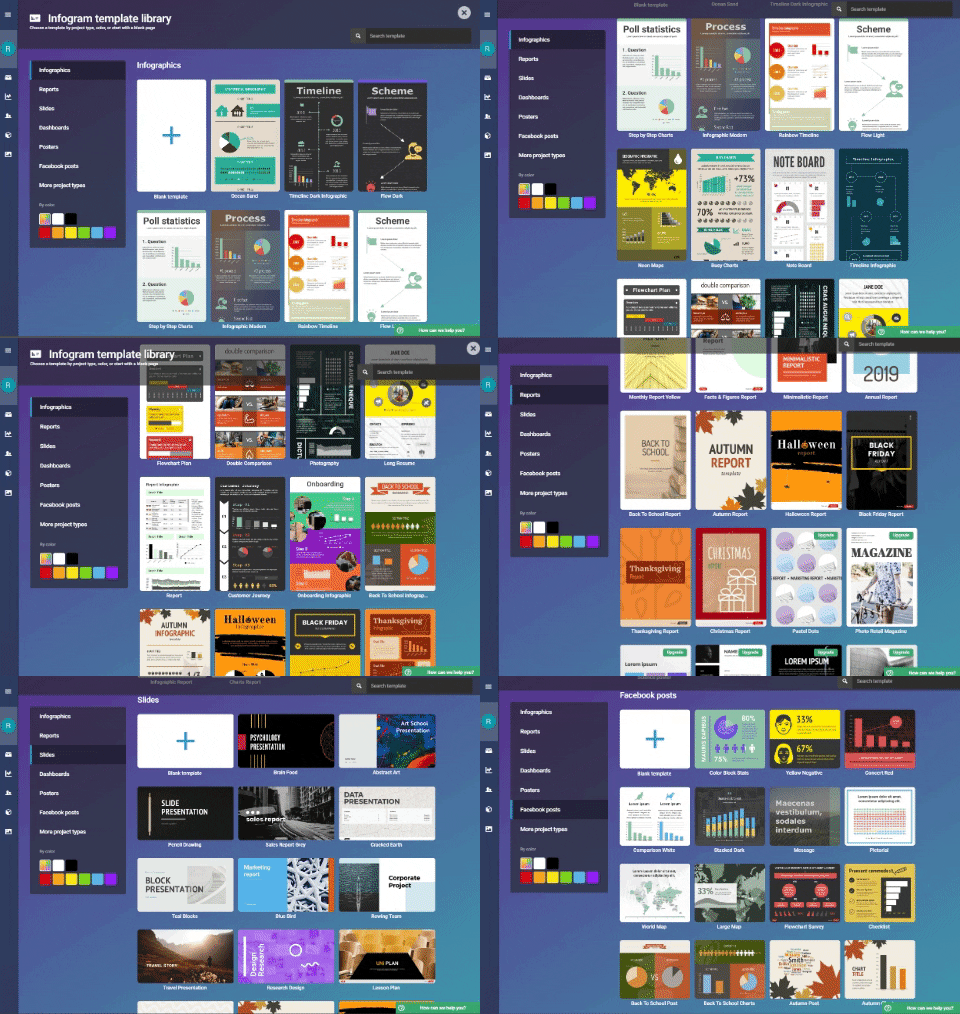
These questions create a more individualized experience with this software. Templates for reports, infographics, slides, posters and other project types are formulated and geared towards the organization and role you answer. This was evident when my templates and experiences became educational because of my selections of schooling and teaching. The basic functions and sample templates are displayed within the GIF I created below:
(Image Source: https://giphy.com/channel/rileysteffen)
As shown, you can create your own graphs from a blank template or from one of the ample they provide you. When creating a Infogram from a free account you are entitled to a selective amount of templates, to further increase these with additional storage and sharing option you can upgrade your account.

(Image Source: https://infogram.com/app/#settings/plans)
When considering student safety and ethical protocols, the process of account creation and use of this technological software within the classroom needs to be approved as an acceptable site to visit by technical support or school administrators. This is because I needed to use my name and email address. This may incur students using fake names or having a standardized account they can access. When creating a project I discovered free accounts cannot privatize what you create, meaning students work would be publicly view-able. This could be a potential ethical dilemma and Copywrite issue.
(Image Source: https://infogram.com/app/#/templates)
However, this link will take you to one of the infographic's I made. It is very easy to use, eye-pleasing and intuitive in software design. When creating statistical infographics there is some knowledge and understandings needed to graph tables in an excel like format. This would be in consideration and explicit teacher instruction would be needed to ensure students excel capacities are developed. There is also how to videos created specifically for using Infogram features. This technology would be fantastic in supporting student engagement and understandings when doing assessment tasks or lesson activities. Overall, Infogram would have countless applications for students to enhance their learning. Using the SAMR Model, I have established below how infographic software might be used in my Science classrooms.

SCIENCE: Performing an Experiment.

Substitution Level: Input experimental data collected into an existing graph template.
Augmentation Level: Change and alter the information according to the average of all students data collected. 
Modification Level: Compare statistical data found individually and averaged data found from all participants and present in a report. 
Redefinition Level: Research statistical information and creates/presents a presentation using/sharing with peers or globally for feedback and questioning.

Learning about and using Infogram has increased my own capacities to use digital media technology and built upon the ways I display data. I hope you have enjoyed learning something new! and think about the potential learning styles you can now cater for with the use this software.

Thanks,
Riley.


Thursday, 26 March 2020

Web Spaces

This week I have been exploring, changing and tweaking a web space known as a blog. I’m beginning to appreciate the functionality and potential benefits web-space's like these can have in the classroom. I have found editing and creating my blog easy, very simplistic and intuitive with the structure and layout. I’ve enjoyed personalizing colour schemes, layout, titles, personal details and other intriguing aspects available. Almost all blogs follow a similar formatting, in most simplest form the image below shows some key things they have.  


Blog contents, look, colours and setting of these things is completely customizable by the author, me in this instance. The added benefit of blogging instead of websites is being able receive comments, lending itself to collaborative learning within a classroom.
I chose to create a blog through google’s app “blogger”. This is my first blog and I’ve come to understand some key differences between Websites, Blogs and Wikis. Website’s are single author and have readers. Blogs also are single author and/ or can sometimes have shared authorship with multiple readers and commentators. Wiki’s on the other hand have multiple authors / collaborators. The image below demonstrates the relationship all three (3) web spaces have between the author and audience engagement.


In general, the benefits and effectiveness of ICT’s to adapt and communicate content to learners within a classroom environment has become very clear. They could be as limited or limitless as you make it. The use of ICT’s for the teacher, allows them to slowly become a facilitator of resources, knowledge and the classroom, rather than being the expert regarded as the sole source of information. The indirect effect of using more digital pedagogy as well, is the transfer of learning responsibility due to students having to explore, apply and learn through more individualized, guided activities. The responsibilities and customization available for learning and individualization is unbelievable and would enhance learners experiences as they have to become creators and publishers of knowledge, communicators, collaborators and local experts within these web spaces. My understandings of websites, blogs and wikis has grown, the easily identifiable benefits these spaces offer for learners is the additional, alternative resources, open materials and genuine learner-centredness these can provide.

I personally could facilitate learning to my students in the classroom through the use of a blog to: 
  • Brainstorm
  • Challenge others 
  • Problem solve
  • Respond to content, video
  • Online debates
  • Learning journal
  • Set goals
  • Feedback
  • Reflect on reading
  • Present work
The road block to implementing these awesome digital pedagogies could be school resource availability, student computer accessibility and home environment (if they have home computer or internet). As a teacher these things must be considered when working with this form of technology. Making a blog, wiki and websites safe is another key component. You can privatize these spaces and register viewers or collaborators what would give the flexibility to create protected areas. This could be done individually, in groups or even by classroom to ensure student safety and teacher guidance is maintained. 

Using The SAMR Model, a framework for synthesizing pedagogy, digital technology and Bloom's Taxonomy, I've provided some examples in context to physical education: 
  • Substitution level: Students lesson contents, readings and task information is displayed through online website that is accessible to all PE students within that classroom.
  • Augmentation level: Students could be provided a research list or extended answer quiz where they have to use online resources and researching to understand, evaluate and apply their findings. 
  •  Modification level: Students have to analyse their game of badminton through using a excel spreadsheet for recording errors in which region of the court, evaluating, analyzing and visually displaying data collected through graphical features found on excel.
  • Redefinition level: Students then use their information gathered from excel to create a 5 min presentation, embedding and creating audio, video and graphical features from excel to explain where their errors were most prevalent and what strategies they could use to fix this. They then publish on a public wiki, interacting globally with experts and audience who they could collaborate with. 
References:

Firstsiteguide. (2018). What is a Blog? - Definition of blog, blogging and blogger. Retrieved from https://firstsiteguide.com/what-is-blog/ 

CQU. (2020). Digital Learning and Teaching Zoom: Topic 3 Tutorial Digital Tools: WEB SPACES. Retrieved from https://echo360.org.au/lesson/35e84d7f-730d-45a9-a706-a0443a6b4c92/classroom